Isolated Storage in Business Central: The Right Way to Keep Your Secrets Safe
I see this question come up almost every time I run an AL training: "where do I put the API key for this integration?" And nine times out of ten, the answer someone tries first is a plain text field on a table, maybe with a mask on top so it shows asterisks on screen. It feels safe enough, until you remember that table is sitting in a SQL database that plenty of tools and plenty of people can reach.
Business Central already ships with a proper answer to this problem: Isolated Storage. It's been there for years, but a lot of developers still don't reach for it by default. Here's what it is, how it actually works under the hood, and how to wire it into a real extension.

Why a masked field isn't enough
A field with ExtendedDatatype = Masked hides the value on the page, replacing it with asterisks. That's a reasonable first move, but it only protects the screen. Anyone who builds a new page over the same table, without applying that mask, sees the raw value. And if someone with bad intentions ships their own extension pointing at your table, they read the key directly. The mask is cosmetic. The data underneath is still sitting there, unprotected.
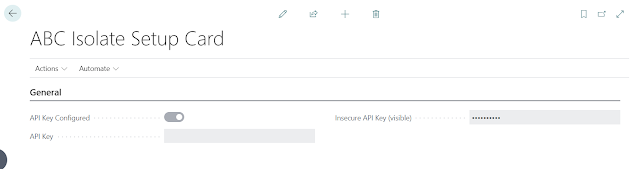
So what is Isolated Storage, really
Isolated Storage is a system table already built into Business Central. You don't design it, Microsoft did, and you interact with it through a small set of built-in functions instead of writing SQL against it yourself:
- Set stores a value under a key.
- Get retrieves the value for a key.
- Contains checks whether a key already has a stored value.
- Delete removes the value for a key.
Every entry carries context beyond just the key-value pair: which extension wrote it, which company, and which user. That context is what lets you choose a scope. Company scope makes a value available to any user working in that company, which is the common choice for something like a shared API key. User scope keeps it tied to a single person. There's also module and combined company-and-user scope for narrower cases.
Where the difference actually shows up
Open the page inspector (Ctrl+Alt+F1) on a masked field backed by a normal table, and you'll still see asterisks. That part works fine. The real issue is that the value is still reachable through the underlying data model no matter what the page shows. Isolated Storage removes that problem at the root: the value never lives in a regular table field at all. The moment you save it, it disappears from any visible field and becomes something only the system codeunit can hand back to you.
Putting it together: Set, Contains, Delete, Get
A typical flow looks like this in practice.
Before writing a new value, check with Contains whether a key already exists, and if it does, remove it first with Delete. That avoids stepping on an old value or ending up with a conflict when you write the new one.
When you save with Set, give the key a descriptive name (something like ABC External Service API Key works well), and wrap the value in a SecretText rather than a plain Text. SecretText adds a layer most developers don't think about: its content can't be inspected even while stepping through the extension in the debugger. It stays hidden for its entire lifetime, not just once it's saved.
When the extension needs the value later, say to authenticate an HTTP call, check Contains first, then read it back with Get, again as a SecretText, so it stays unreadable even under a debugging session.
One more layer: mark the codeunit Internal
Storing the value in Isolated Storage isn't the end of the story if anyone can build an extension that calls your read procedures directly. Declaring the codeunit that wraps this access, or at least its read methods, as Internal closes that gap. A dependent extension can no longer call those procedures from outside and pull the value out. It's a small change that meaningfully shrinks the attack surface, even for someone who already knows the key exists.
Where this earns its keep
This pattern is worth reaching for anywhere your extension touches something sensitive: API keys for external services, client secrets in OAuth integrations, and credentials for the AI calls that are now part of almost every project, whether that's GPT, Azure AI, or something similar. Given how many integrations a typical Business Central setup connects to today, treating secret storage as an afterthought isn't really an option anymore.
Wrapping up
Isolated Storage solves a concrete problem: keeping credentials out of reach of the database, the debugger, and any extension that isn't yours, without giving up the convenience of storing them inside Business Central itself. Combine Set, Get, Contains and Delete with SecretText and an Internal access modifier, and none of those three attack paths gets you anywhere. If your extension handles API keys, client secrets, or anything else confidential, this is the pattern to reach for instead of a text field with a mask on it.